15 n8n Workflow Templates for Small Business Automation (Copy & Deploy in Minutes)
Stop building workflows from scratch. These 15 battle-tested n8n workflow templates automate everything from lead capture to customer support—ready to deploy in your business today.

<h1>15 n8n Workflow Templates for Small Business Automation (Copy & Deploy in Minutes)</h1>
<p>If you're running a small business, you know the struggle: you're wearing ten different hats, juggling client work, marketing, admin tasks, and somehow trying to grow. Meanwhile, you've heard that automation can save you hours every week, but the thought of building workflows from scratch feels overwhelming.</p>
<p>Here's the truth: you don't need to be a developer or spend weeks learning n8n to automate your business. With the right templates, you can deploy powerful automations in minutes, not months.</p>
<p>In this guide, I'm sharing 15 proven n8n workflow templates that small businesses use every day to save 15-20 hours per week. Each template is ready to copy, customize, and deploy—no coding required.</p>
<h2>Why n8n for Small Business Automation?</h2>
<p>Before we dive into the templates, let's quickly cover why n8n has become the go-to automation tool for small businesses:</p>
<ul>
<li><strong>Self-hosted or cloud:</strong> You control your data and costs</li>
<li><strong>400+ integrations:</strong> Connect all your favorite tools</li>
<li><strong>Visual workflow builder:</strong> No coding required (but you can if you want)</li>
<li><strong>Cost-effective:</strong> Free self-hosted option or affordable cloud plans</li>
<li><strong>Powerful logic:</strong> Handle complex workflows that Zapier can't</li>
</ul>
<p>Now, let's get into the templates that will transform how you run your business.</p>
<h2>Lead Generation & Sales Automation</h2>
<h3>1. Automated Lead Capture & CRM Sync</h3>
<p><strong>What it does:</strong> Captures leads from your website forms, landing pages, or social media, then automatically adds them to your CRM with proper tagging and segmentation.</p>
<p><strong>Workflow steps:</strong></p>
<ul>
<li>Webhook receives form submission</li>
<li>Validates and cleans data</li>
<li>Checks for duplicates in CRM</li>
<li>Creates or updates contact record</li>
<li>Assigns lead score based on criteria</li>
<li>Triggers welcome email sequence</li>
<li>Notifies sales team via Slack</li>
</ul>
<p><strong>Time saved:</strong> 5-10 hours/week on manual data entry</p>
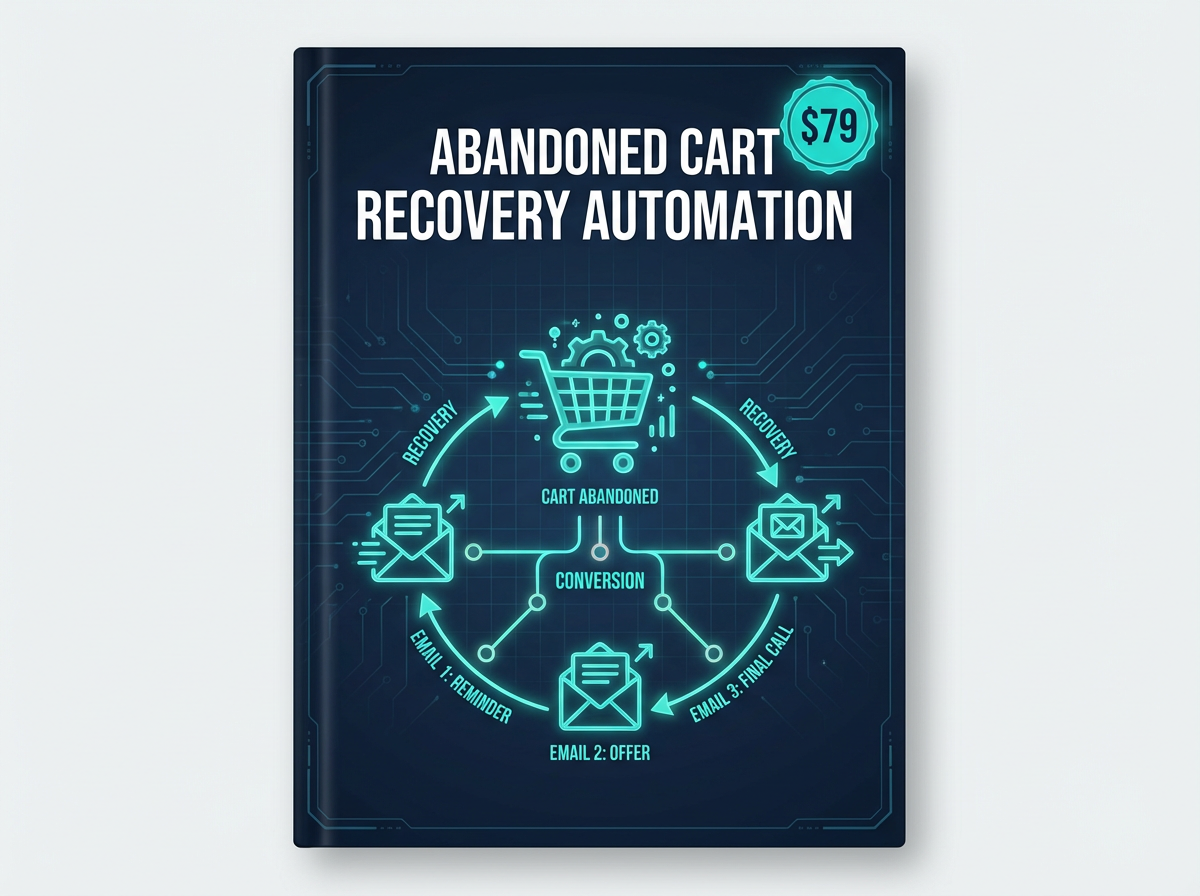
<h3>2. Abandoned Cart Recovery System</h3>
<p><strong>What it does:</strong> Automatically detects when customers add items to cart but don't complete purchase, then sends a series of recovery emails with incentives.</p>
<p><strong>Workflow steps:</strong></p>
<ul>
<li>Monitors cart activity via webhook</li>
<li>Waits 1 hour after cart abandonment</li>
<li>Sends first reminder email with cart contents</li>
<li>Waits 24 hours, sends second email with 10% discount</li>
<li>Waits 48 hours, sends final email with 15% discount</li>
<li>Tracks conversions and updates analytics</li>
</ul>
<p><strong>Time saved:</strong> Automated revenue recovery (typically 15-30% of abandoned carts)</p>
<p>The <a href="https://designvault.abacusai.app/products/n8n-abandoned-cart-recovery">Abandoned Cart Recovery Automation</a> template includes all three email sequences pre-written and optimized for maximum conversions.</p>
<h3>3. AI-Powered Lead Qualification</h3>
<p><strong>What it does:</strong> Uses AI to analyze incoming leads, score them based on fit, and route high-quality leads to your sales team immediately.</p>
<p><strong>Workflow steps:</strong></p>
<ul>
<li>Receives lead data from multiple sources</li>
<li>Enriches data with company information (Clearbit, Hunter.io)</li>
<li>AI analyzes fit based on your ideal customer profile</li>
<li>Assigns lead score (0-100)</li>
<li>Routes hot leads (80+) to sales immediately</li>
<li>Nurtures warm leads (50-79) via email</li>
<li>Archives cold leads (below 50)</li>
</ul>
<p><strong>Time saved:</strong> 8-12 hours/week on lead qualification</p>
<h2>Marketing Automation</h2>
<h3>4. Social Media Auto-Poster with Content Recycling</h3>
<p><strong>What it does:</strong> Automatically posts your content across multiple social platforms, then recycles top-performing posts after 30-60 days.</p>
<p><strong>Workflow steps:</strong></p>
<ul>
<li>Pulls content from your content calendar (Notion, Airtable, Google Sheets)</li>
<li>Formats content for each platform (Twitter, LinkedIn, Facebook)</li>
<li>Posts at optimal times based on your audience</li>
<li>Tracks engagement metrics</li>
<li>Identifies top 20% performing posts</li>
<li>Automatically reschedules winners after 45 days</li>
</ul>
<p><strong>Time saved:</strong> 6-8 hours/week on social media management</p>
<p>The <a href="https://designvault.abacusai.app/products/n8n-social-media-autoposter">Social Media Auto-Poster</a> template supports 10+ platforms and includes smart scheduling based on your audience's activity patterns.</p>
<h3>5. Email Marketing Automation with Behavioral Triggers</h3>
<p><strong>What it does:</strong> Sends personalized emails based on subscriber behavior—opens, clicks, purchases, page visits, and more.</p>
<p><strong>Workflow steps:</strong></p>
<ul>
<li>Monitors subscriber behavior across your website and emails</li>
<li>Triggers specific sequences based on actions</li>
<li>Personalizes content based on interests and history</li>
<li>A/B tests subject lines and content automatically</li>
<li>Removes unengaged subscribers to maintain list health</li>
</ul>
<p><strong>Time saved:</strong> 4-6 hours/week on email campaign management</p>
<h3>6. Content Distribution Pipeline</h3>
<p><strong>What it does:</strong> Takes one piece of long-form content and automatically repurposes it into 10+ formats across multiple channels.</p>
<p><strong>Workflow steps:</strong></p>
<ul>
<li>Monitors your blog for new posts</li>
<li>Extracts key quotes and insights using AI</li>
<li>Creates social media posts (Twitter threads, LinkedIn posts, Instagram captions)</li>
<li>Generates email newsletter content</li>
<li>Creates video script outline</li>
<li>Schedules everything across platforms</li>
</ul>
<p><strong>Time saved:</strong> 5-7 hours/week on content repurposing</p>
<h2>Customer Success & Support</h2>
<h3>7. Automated Customer Onboarding Journey</h3>
<p><strong>What it does:</strong> Delivers a personalized onboarding experience to every new customer, ensuring they get value quickly and reducing churn.</p>
<p><strong>Workflow steps:</strong></p>
<ul>
<li>Triggers when new customer signs up or makes purchase</li>
<li>Sends welcome email with getting started guide</li>
<li>Day 2: Sends tutorial video for key feature</li>
<li>Day 5: Checks if they've completed key actions, sends help if not</li>
<li>Day 10: Requests feedback and offers support call</li>
<li>Day 30: Sends case studies and upsell opportunities</li>
</ul>
<p><strong>Time saved:</strong> 10-15 hours/week on customer onboarding</p>
<h3>8. Smart Support Ticket Routing</h3>
<p><strong>What it does:</strong> Automatically categorizes, prioritizes, and routes support tickets to the right team member based on expertise and workload.</p>
<p><strong>Workflow steps:</strong></p>
<ul>
<li>Receives support ticket from email, chat, or form</li>
<li>AI analyzes ticket content and categorizes (billing, technical, general)</li>
<li>Assigns priority level (urgent, high, medium, low)</li>
<li>Checks team member availability and expertise</li>
<li>Routes to best-fit team member</li>
<li>Sends auto-reply to customer with expected response time</li>
<li>Escalates if not resolved within SLA</li>
</ul>
<p><strong>Time saved:</strong> 3-5 hours/week on ticket management</p>
<h3>9. Customer Feedback Collection & Analysis</h3>
<p><strong>What it does:</strong> Automatically collects customer feedback at key touchpoints, analyzes sentiment, and alerts you to issues before they become problems.</p>
<p><strong>Workflow steps:</strong></p>
<ul>
<li>Triggers feedback requests at strategic moments (post-purchase, after support interaction, milestone achievements)</li>
<li>Collects responses via email, SMS, or in-app</li>
<li>AI analyzes sentiment (positive, neutral, negative)</li>
<li>Routes negative feedback to customer success team immediately</li>
<li>Aggregates positive feedback for testimonials</li>
<li>Generates weekly sentiment report</li>
</ul>
<p><strong>Time saved:</strong> 4-6 hours/week on feedback management</p>
<h2>Operations & Admin Automation</h2>
<h3>10. Invoice Generation & Payment Follow-up</h3>
<p><strong>What it does:</strong> Automatically generates invoices, sends them to clients, and follows up on overdue payments without you lifting a finger.</p>
<p><strong>Workflow steps:</strong></p>
<ul>
<li>Triggers when project is marked complete or on recurring schedule</li>
<li>Generates invoice from template with project details</li>
<li>Sends invoice to client via email</li>
<li>Tracks payment status</li>
<li>Sends friendly reminder 3 days before due date</li>
<li>Sends overdue notice 1 day after due date</li>
<li>Escalates to you after 7 days overdue</li>
</ul>
<p><strong>Time saved:</strong> 3-4 hours/week on invoicing and collections</p>
<h3>11. Meeting Scheduler with Auto-Prep</h3>
<p><strong>What it does:</strong> Handles meeting scheduling, sends reminders, and automatically prepares briefing documents before each meeting.</p>
<p><strong>Workflow steps:</strong></p>
<ul>
<li>Syncs with your calendar</li>
<li>When meeting is booked, pulls relevant context (CRM notes, previous emails, project status)</li>
<li>Generates meeting brief with key talking points</li>
<li>Sends calendar invite with agenda</li>
<li>Sends reminder 24 hours before</li>
<li>Sends reminder 1 hour before with meeting link</li>
<li>After meeting, sends follow-up email with action items</li>
</ul>
<p><strong>Time saved:</strong> 2-3 hours/week on meeting coordination</p>
<h3>12. Expense Tracking & Categorization</h3>
<p><strong>What it does:</strong> Automatically captures business expenses from email receipts, categorizes them, and syncs to your accounting software.</p>
<p><strong>Workflow steps:</strong></p>
<ul>
<li>Monitors email for receipts</li>
<li>Extracts expense details (amount, vendor, date)</li>
<li>AI categorizes expense (travel, software, marketing, etc.)</li>
<li>Adds to expense tracking spreadsheet or accounting software</li>
<li>Flags expenses that need approval</li>
<li>Generates monthly expense report</li>
</ul>
<p><strong>Time saved:</strong> 2-3 hours/week on expense management</p>
<h2>Team Collaboration & Productivity</h2>
<h3>13. Daily Standup Automation</h3>
<p><strong>What it does:</strong> Collects daily updates from team members asynchronously and compiles them into a digest for the whole team.</p>
<p><strong>Workflow steps:</strong></p>
<ul>
<li>Sends Slack message to team members at 9 AM: "What are you working on today?"</li>
<li>Collects responses throughout the morning</li>
<li>At noon, compiles all updates into formatted digest</li>
<li>Posts digest to team channel</li>
<li>Identifies blockers and alerts relevant team members</li>
<li>Archives updates for weekly review</li>
</ul>
<p><strong>Time saved:</strong> 2.5 hours/week (30 min daily standup × 5 days)</p>
<h3>14. Project Status Reporting</h3>
<p><strong>What it does:</strong> Automatically generates project status reports by pulling data from your project management tools and sending updates to stakeholders.</p>
<p><strong>Workflow steps:</strong></p>
<ul>
<li>Connects to project management tool (Asana, Trello, ClickUp)</li>
<li>Pulls task completion rates, upcoming deadlines, blockers</li>
<li>Generates formatted status report</li>
<li>Sends to stakeholders via email or Slack</li>
<li>Highlights at-risk projects</li>
<li>Runs weekly or on-demand</li>
</ul>
<p><strong>Time saved:</strong> 3-4 hours/week on status reporting</p>
<h3>15. Knowledge Base Auto-Update</h3>
<p><strong>What it does:</strong> Monitors your support tickets, identifies common questions, and automatically creates or updates knowledge base articles.</p>
<p><strong>Workflow steps:</strong></p>
<ul>
<li>Analyzes support tickets for recurring questions</li>
<li>Identifies questions asked 3+ times</li>
<li>AI generates draft knowledge base article</li>
<li>Sends draft to team for review</li>
<li>Once approved, publishes to knowledge base</li>
<li>Links article in future tickets about same topic</li>
</ul>
<p><strong>Time saved:</strong> 2-3 hours/week on documentation</p>
<h2>Getting Started: Your Automation Implementation Plan</h2>
<p>Don't try to implement all 15 workflows at once. Here's a strategic rollout plan:</p>
<p><strong>Week 1-2: Quick Wins (Start Here)</strong></p>
<ul>
<li>Automated Lead Capture & CRM Sync</li>
<li>Social Media Auto-Poster</li>
<li>Invoice Generation & Payment Follow-up</li>
</ul>
<p><strong>Week 3-4: Customer Experience</strong></p>
<ul>
<li>Automated Customer Onboarding</li>
<li>Smart Support Ticket Routing</li>
<li>Customer Feedback Collection</li>
</ul>
<p><strong>Week 5-6: Marketing & Sales</strong></p>
<ul>
<li>Email Marketing Automation</li>
<li>AI-Powered Lead Qualification</li>
<li>Content Distribution Pipeline</li>
</ul>
<p><strong>Week 7-8: Operations & Team</strong></p>
<ul>
<li>Meeting Scheduler with Auto-Prep</li>
<li>Daily Standup Automation</li>
<li>Project Status Reporting</li>
</ul>
<h2>Ready-to-Deploy n8n Templates</h2>
<p>Building these workflows from scratch would take weeks or months. The good news? You don't have to.</p>
<p>The <a href="https://designvault.abacusai.app/products/n8n-complete-business-automation-kit">Complete n8n Business Automation Kit</a> includes all 15 of these workflow templates, plus 25 more, ready to import into your n8n instance. Each template comes with:</p>
<ul>
<li>Pre-built workflow (just add your API keys)</li>
<li>Step-by-step setup guide</li>
<li>Customization instructions</li>
<li>Video walkthrough</li>
<li>Support documentation</li>
</ul>
<p>You can have your first automation running in under 15 minutes.</p>
<p><strong>Use code AUTOMATE20 at checkout to get 20% off and start automating your business today.</strong></p>
<h2>The Bottom Line</h2>
<p>Small business automation isn't about replacing humans—it's about freeing humans to do what they do best: creative thinking, relationship building, and strategic decision-making.</p>
<p>These 15 n8n workflow templates can save you 15-20 hours per week. That's 60-80 hours per month you can reinvest in growing your business, serving customers better, or simply having a life outside of work.</p>
<p>The question isn't whether you can afford to automate. It's whether you can afford not to.</p>
<p>Start with one workflow this week. Then add another next week. Before you know it, you'll have a business that runs smoothly whether you're at your desk or on a beach somewhere.</p>
Tools to Put This Into Practice
Skip the DIY — these templates are built for exactly what you just read about.